Nieuwbouwers runs new-build housing for Dutch municipalities: projects, release rounds, enrolments, payments — we covered the platform itself in a separate case. This page is about what came next: making that platform feel like it has an extra colleague. Not a chatbot widget bolted on, but AI wired into the same rights, the same audit trail and the same discipline as the rest of the system.
One gateway, three faces
Every AI feature runs through one gateway built on the Laravel AI SDK. At its core sits a contract registry: exactly eight content entities — projects, villages, phases, release rounds, objects, news, FAQs, pages — each with a declared schema of readable and writable fields. That registry is the whole world as far as the AI is concerned. Users, enrolments, payments, conversations? No contract, so they don't exist. A test suite locks the list; widening it is a deliberate, reviewed decision — never a side effect.
Inside every tool the server re-checks the acting user's rights and tenant access. What the AI can do is always the intersection of what its tools allow and what you are allowed — the model's enthusiasm doesn't enter into it.
The AI assistant: an extra pair of hands
On every backoffice page, staff and project developers can open the AI-assistent — a slide-over chat that streams its answers live. It looks things up with real tools (search, read, count, describe schema), so answers come from the database, not from vibes. It's also honest about its limits: ask about visitor enrolments and it will tell you those are outside its reach, by design.
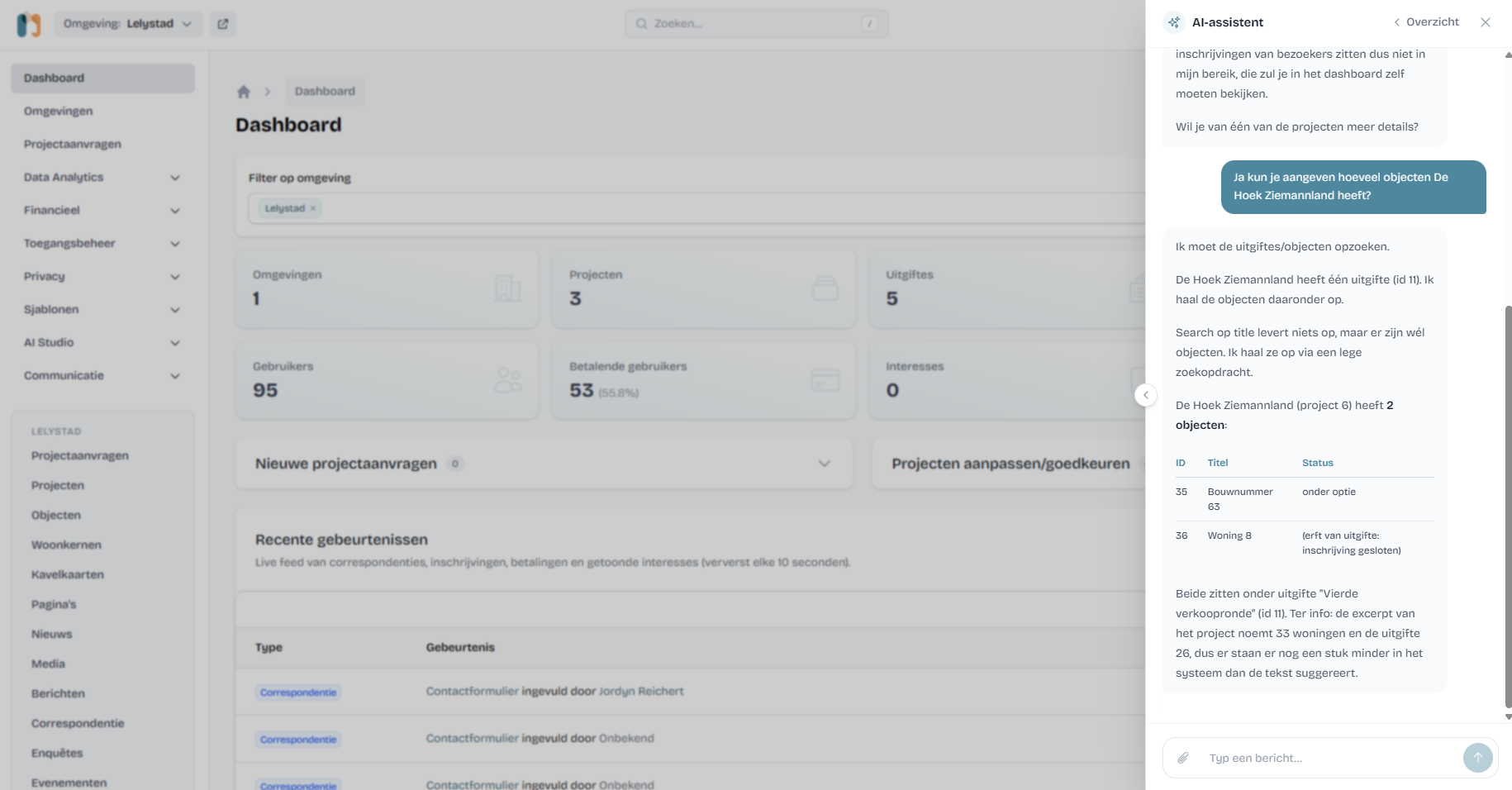
Writing is where most AI integrations get scary, so here it's a two-step: the assistant never edits records directly. It builds a change proposal — a diff card showing exactly which fields change on which records — and a human clicks approve or reject. On approval, the change is re-validated and applied in a transaction. That covers bulk work too: "give these eight plots the same images as plot 130" becomes eight proposals in one card, approved once, applied with a link to every updated record.
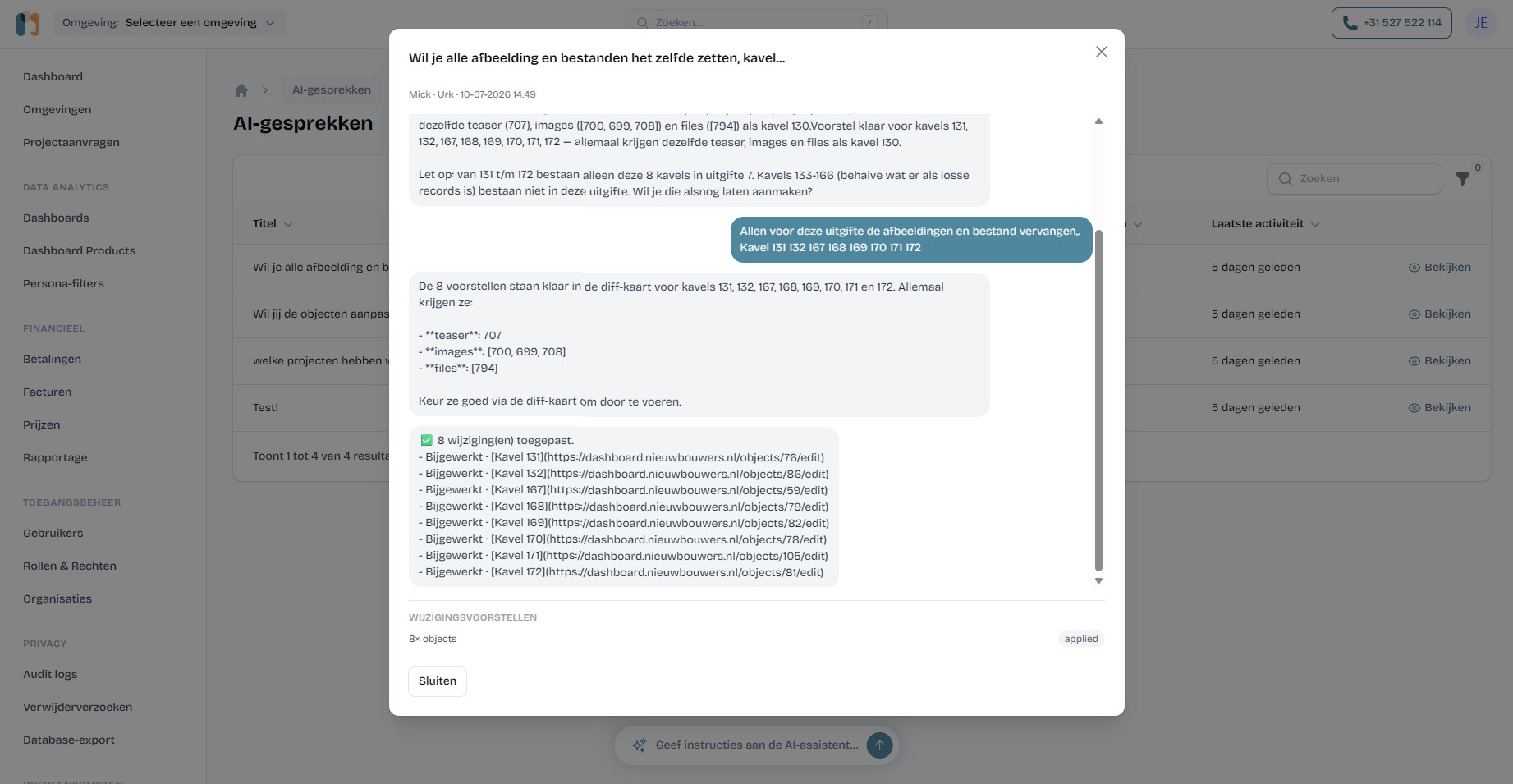
The assistant can also fetch a project developer's website, use it as source material for new content, and import its images into the media library — capped, confirmed in chat, and guarded against fetching anything internal. Admins see every conversation in an AI-gesprekken overview, so "what did the AI do last week" is a table, not a mystery.
AI workflows: the assistant, on a schedule
Some work shouldn't wait for someone to ask. A workflow is a saved prompt with a trigger, a mode and a set of capability toggles — the same gateway, running headless. Every morning at eight, one workflow drafts a local news article for the Lelystad region: it searches the web for regional housing news, writes the piece in Dutch, adds source attribution at the bottom, and saves it as a hidden draft for an editor to review.
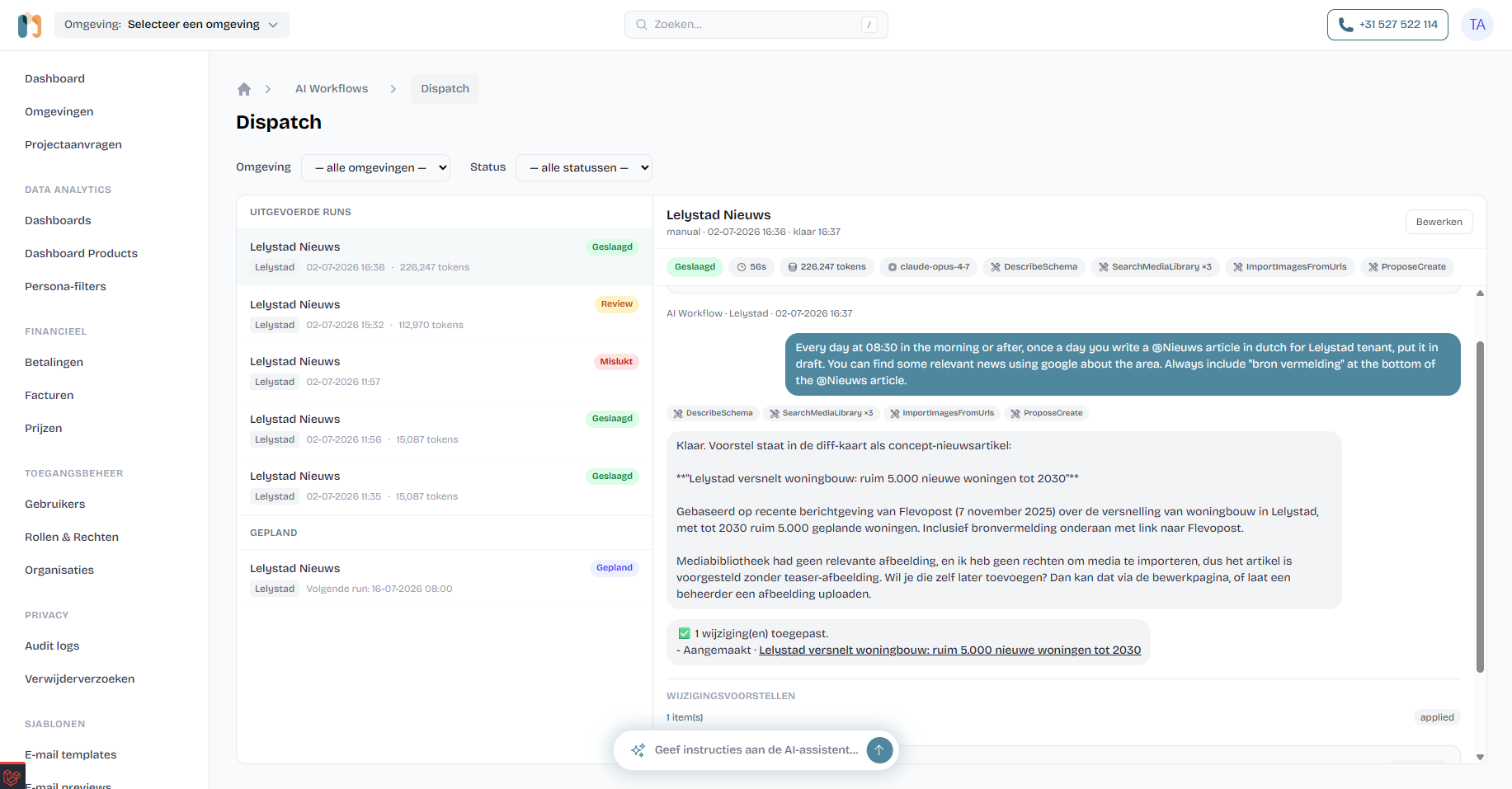
Workflows come in three modes: report only (read and email a summary to staff), write as draft (changes land hidden, a human publishes), and auto-apply — which still refuses one thing categorically: deleting. A workflow that proposes a delete is demoted to manual review on the spot. Underneath, every run executes as a fixed system role that has create and edit rights on the eight content entities and no delete right at all — a rule the role editor itself can't change.
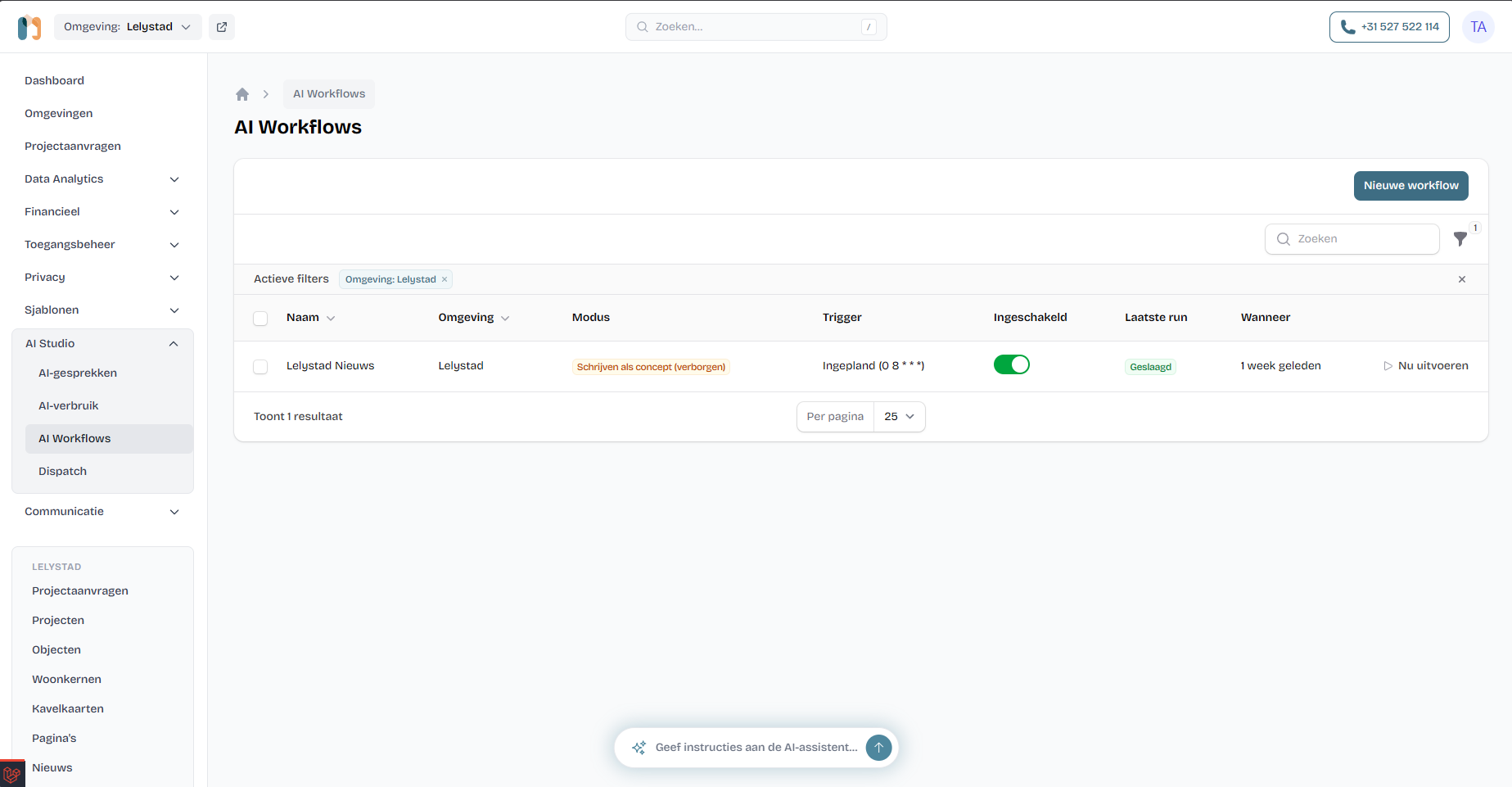
Configuration is deliberately friendly: a recurrence picker instead of raw cron, capability toggles for web search, media library and email, and @-mentions in the prompt editor that autocomplete over the entities and tools you've enabled — mentioning something never widens access, it only makes prompts precise. Each run is capped by a token budget and a daily run limit, and the Dispatch board shows every run with its status, duration, model and token count.
An AI helpdesk for home seekers
The third face lives on the public side. Logged-in members can ask the site's AI helpdesk the questions a busy housing team answers all day: what's coming in my village, which plots fit a semi-detached, where do I find the brochure. It reads only publicly visible content — across all regions, with the current one boosted — and links straight to the pages and documents it cites.
This one is read-only by construction: three search-and-read tools, seven public content types, no write path at all. It knows nothing personal — not even the profile of the person asking. It runs on a fast, small Claude model with its own rate limits and a daily token budget, so a curious crowd can't run up the bill.
The quiet AI
Two smaller pieces do their work without a chat window. An AI check runs at save-time: an admin writes the content guidelines once, and when a developer saves a project or event, the model checks the changed fields against them and can block the save with concrete, human-readable issues — if the check times out, the save simply proceeds. And the spreadsheet import wizard uses AI to recognise sheets and map columns from whatever Excel file a developer uploads — it only ever suggests a mapping, from a 20-row sample, and a human confirms before anything is imported.
All of it is metered. A usage dashboard records every call — assistant, helpdesk, checks, imports, workflows — with real token counts and cost per feature. When someone asks "what does the AI cost us?", the answer is a screen, not a shrug.
Safety is the architecture
The design doc's first principle: treat the model as an untrusted, possibly-hijacked user.
That principle shows up everywhere. The assistant has no email, webhook or free-form HTTP tools — so a prompt injection in a fetched web page has nowhere to send anything; the worst it can achieve is a change proposal a human rejects. Rights are enforced server-side inside every tool. Every message to and from the AI lands in the same audit trail as human actions — as metadata, not content — and applied AI changes are stamped with the change set that caused them. Prompt logs live seven days; chat attachments are deleted after seven. And the platform's own privacy doc states the guarantee plainly: the platform itself never sends home seekers' personal data to an AI provider.
For the EU AI Act and data residency questions that come with all of this, we build to EU-compliant standards by default — see our EU Ready page.
The result
The team got a colleague that never sleeps: bulk edits that took an afternoon are a chat message and one approval; news drafts wait in the CMS before the editor's coffee; home seekers get sourced answers at 11 pm. And because every action is scoped, budgeted, approved and logged, the people responsible for the platform can say yes to AI without crossing their fingers.
FAQ
Can YoTech add an AI layer like this to our software?
Yes — that's the point of this case. The pattern (entity contracts, a small set of tools, an approval gate, budgets and audit) ports to any product with an admin panel and a database. Laravel is home turf, but the architecture isn't tied to it.
Can the AI change or delete data on its own?
Writes are proposals: the assistant builds a diff card that a human approves or rejects, and every approved change is re-validated and applied in a transaction. Workflows run under a fixed role that has no delete rights at all; in auto mode, any proposed delete demotes the run to manual review. Deletes in chat are disabled by default.
Is our customers' personal data safe?
The guarantee is structural, not a prompt: only content entities have AI contracts, so users, enrolments, payments and messages simply don't exist for the AI. The system prompt carries no user identity, Anthropic doesn't train on API data, prompt logs are kept seven days and chat attachments are deleted after seven days.
What does it cost to run?
Each job gets the right model — a heavyweight Claude model for the assistant and workflows, a fast small one for the helpdesk and content checks. Every call is metered in a usage dashboard with real token counts and cost, and budgets per turn, per run and per day cap the spend before it happens.
What if someone tries to abuse it — prompt injection?
The design assumes the model can be hijacked. The assistant has no email or webhook tools, so injected instructions can't exfiltrate data; rights are enforced server-side inside every tool; the worst case is a change proposal a human rejects. Rate limits and token budgets throttle abuse, and every message lands in the audit trail.
Want an AI layer like this inside your own product? Plan a call — we build it under your brand, white-label.